Agentic email workflow
An autonomous agent that triages and responds to inbound contact-form submissions for hwb2 Learning.
- Role
- Solo build
- Year
- December 2025
- Status
- In production
- Links
- Inquiry formRepo (coming soon)
- Google Apps Script
- ChatGPT Agent Builder
- Prompt routing
- Gmail API
The problem
The contact form at hwb2learning.com sits in front of a one-person business. Inquiries arrive while I'm teaching, while I'm planning, and while I'm asleep, and they don't all need the same thing from me. A parent asking whether I have a Tuesday tutoring slot is a different conversation than a school administrator asking about a half-day PD workshop, which is a different conversation than a school's tech lead asking whether I can build a custom classroom tool.
A generic auto-responder felt wrong. The whole pitch of hwb2 Learning is that I'm a real teacher who responds to families personally. I wanted something that could read what someone actually asked, decide what kind of inquiry it was, and draft a reply in my voice, close enough to send.
What I built
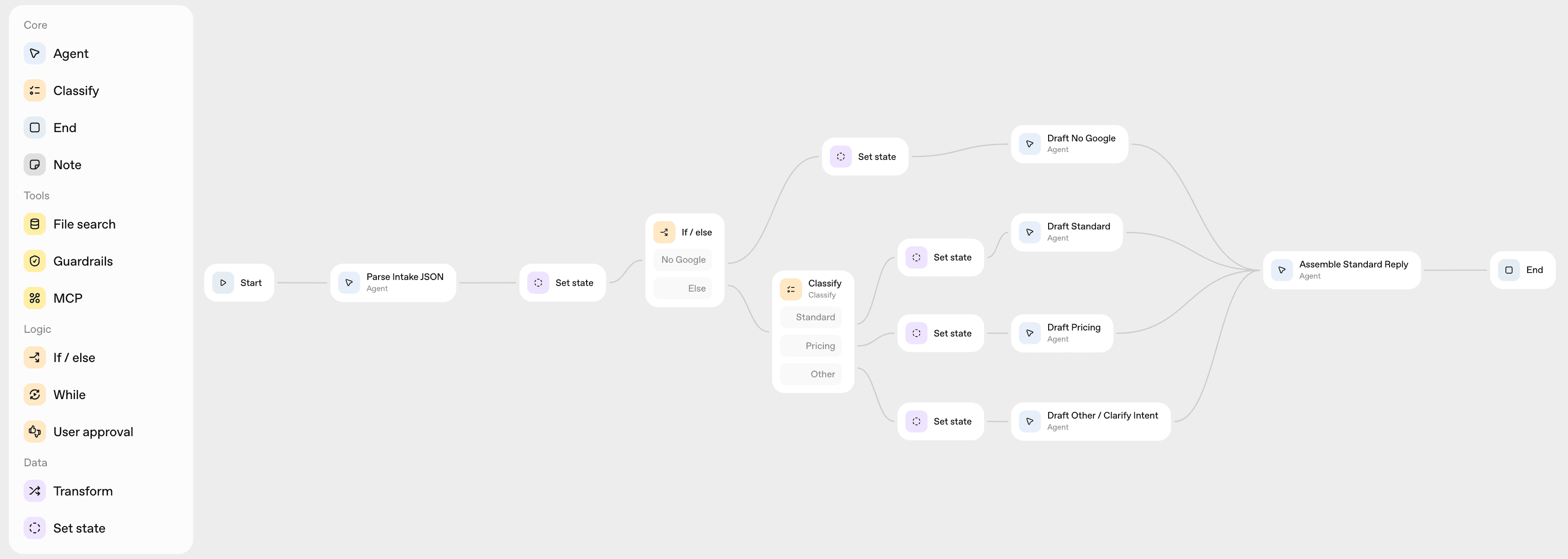
A four-stage pipeline. A form submission triggers an Apps Script function. The script passes the message to a classifier agent that tags it with one of three topics: tutoring, consulting, or development. The tagged message is routed to a topic-specific responder agent, which drafts a reply using a prompt tuned for that audience. The Apps Script then sends the reply through Gmail and logs the exchange to a Google Sheet for later review.
Nothing in this stack is novel on its own. The interesting part is what got composed and what got cut.
Key decisions
Agent Builder, not a custom backend. I'm a one-person shop. ChatGPT Agent Builder let me ship a working multi-agent system without standing up infrastructure I'd then have to maintain, and it gave me a chance to learn the tool against a real problem instead of a tutorial. Trade-off: less control over routing logic and observability, faster ship.
Apps Script as the glue. The form submissions already lived in a Google Sheet: that's where Google Forms drops them by default. Apps Script reads from that sheet natively, runs on form submit as a built-in trigger, and sends through Gmail with a single API call. Using anything else would have meant adding an integration layer for no real gain.
Four responder agents, not one. A classifier reads each submission and routes it to one of four specialized agents, each handling a different type of tutoring inquiry. Every agent drafts its reply from the details the sender provided, then hands off to a final assembly agent that composes the finished response and returns it as JSON to the Apps Script. Splitting the work this way kept each prompt focused on a single job, instead of forcing one general responder to hedge across every kind of request.
How it works
The Apps Script trigger is bound to the form's onFormSubmit event. When a submission arrives, the script extracts the message and the submitter's email, hands the message to the classifier agent, takes back the classification, hands the classified message to the appropriate responder agent, and uses Gmail's API to send the drafted reply. The exchange (original message, classification, and outgoing reply) gets appended to a tracking sheet so I can review what was sent.
The routing layer is the part worth pointing at. The classifier doesn't generate prose; it generates a single topic label. That label is the only signal the orchestration logic needs to pick which responder to call. Keeping the classifier's job narrow keeps it cheap and predictable, and means the responder prompts don't have to do classification work in addition to their writing work.
What I'd change
Two things, both about trust.
Confidence thresholds and human fallback. Right now, every message gets a classification and a response, no matter how ambiguous the inbound message is. If the classifier mislabels a message, the wrong responder handles it and the recipient gets a tone-deaf reply. The next version should ask the classifier to express confidence, and route low-confidence classifications to a human (me) for review before sending.
Better observability. The only log right now is the sheet, which captures what was sent but not how confidently or why. I'd want structured logging (classification confidence, prompt version, latency, anything that fails) before scaling this beyond a personal project. The drafted version is good enough for low volume; it isn't good enough to put behind a real business with multiple inboxes.
Stack and links
Built with Google Apps Script as the glue and ChatGPT Agent Builder for the classifier and three responders. Form submissions arrive through Google Forms; replies go out through Gmail; exchanges are logged to a Google Sheet.
Live at the hwb2learning.com inquiry form. Code repo coming soon.