BST Builder
An interactive binary search tree visualizer that shows how insertion order shapes a tree, and animates the two-child deletion students find hardest to picture.
- Role
- Solo build
- Year
- 2026
- Status
- Live
- Links
- Live demo
- React 18
- SVG
- No build step
- Educational tool
The problem
By the time my Data Structures students reached binary search trees, they could already write the insertion code. The recursion wasn't the hard part: go left if the value's smaller, right if it's larger, drop it in when you hit an empty spot. They could trace it on paper and pass the tests.
What they couldn't see was that the order those values arrive in decides everything. Insert 50, 30, 70, 20, 40, 60, 80 and you get a tidy, balanced tree: any lookup in a few steps. Feed in the same seven numbers in sorted order and the "tree" collapses into a single leaning vine, every node hanging off the one before it, search degraded to walking a list one element at a time. Same values, same code, wildly different performance. And nothing in the source makes that visible. The O(log n) you promised them quietly becomes O(n), and they have no way to watch it happen.
Deletion was the second wall, and a steeper one. Removing a leaf is obvious; removing a node with a single child is nearly so. But the two-child case (find the in-order successor, lift it into the deleted node's place) is the kind of procedure students memorize as four steps without ever picturing what moves. You can draw the before and the after on a whiteboard, but the promotion itself (the successor rising up and out of the right subtree) is a motion, and a still picture can't show motion.
What I built
BST Builder is a single-screen tool: a control panel on the left, a live tree canvas on the right. A student starts by clicking one of two presets. Sequence 1 inserts 50, 30, 70, 20, 40, 60, 80; Sequence 2 inserts those same seven values in sorted order. The tree builds itself one node at a time: each insertion animates into place, and the value currently being inserted pulses in the insertion-order list below, so you can watch where each number decides to go and why.
A stats panel tracks the tree as it grows: node count, current height, the ideal height for that many nodes, and a status read (Balanced, Unbalanced, or Degenerate). Once a student has run both presets, a comparison table appears: same node count, but Sequence 2's height is double Sequence 1's, and the "max comparisons" row makes the cost concrete. That table is the whole shape-and-performance lesson in four rows.
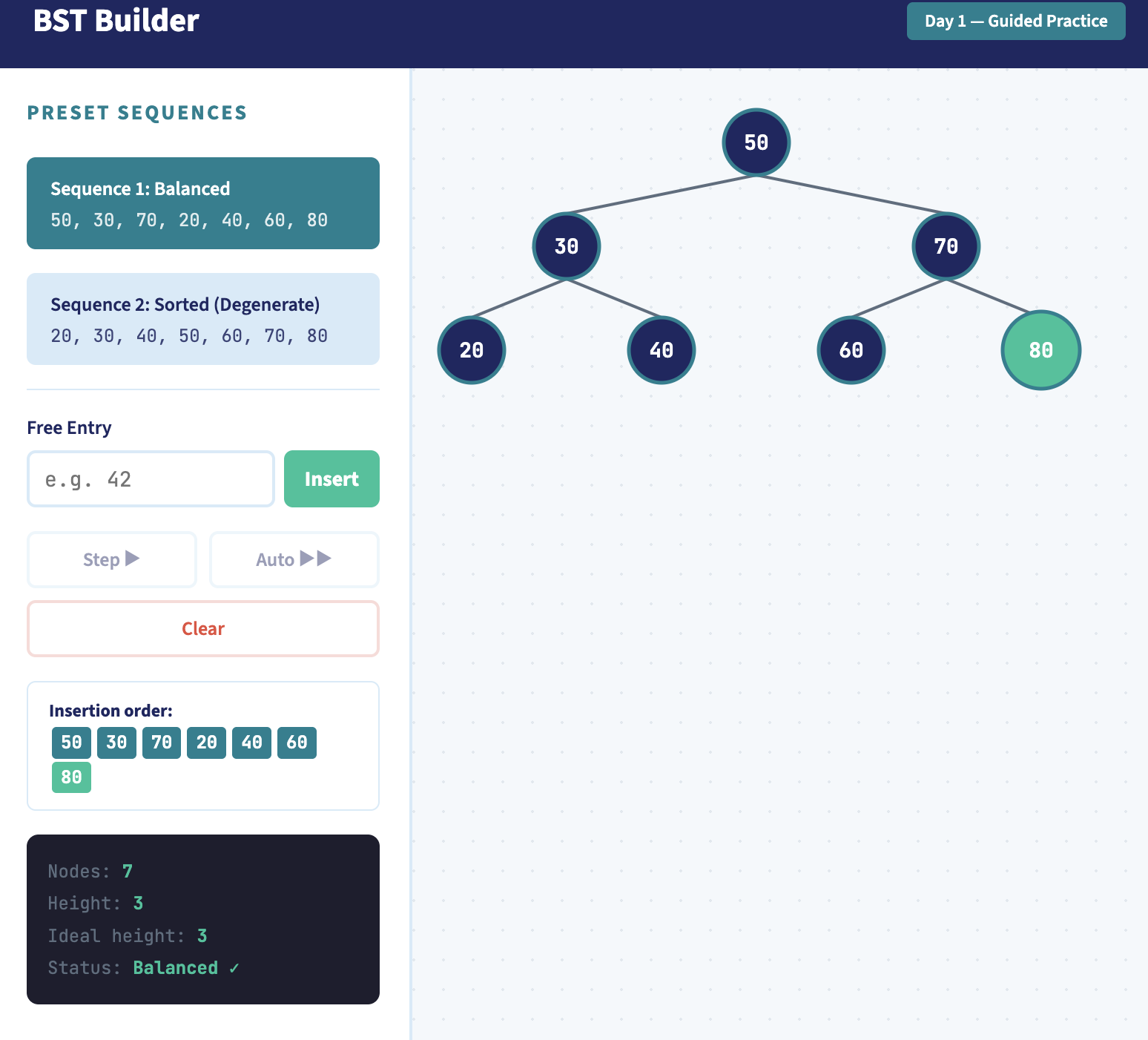
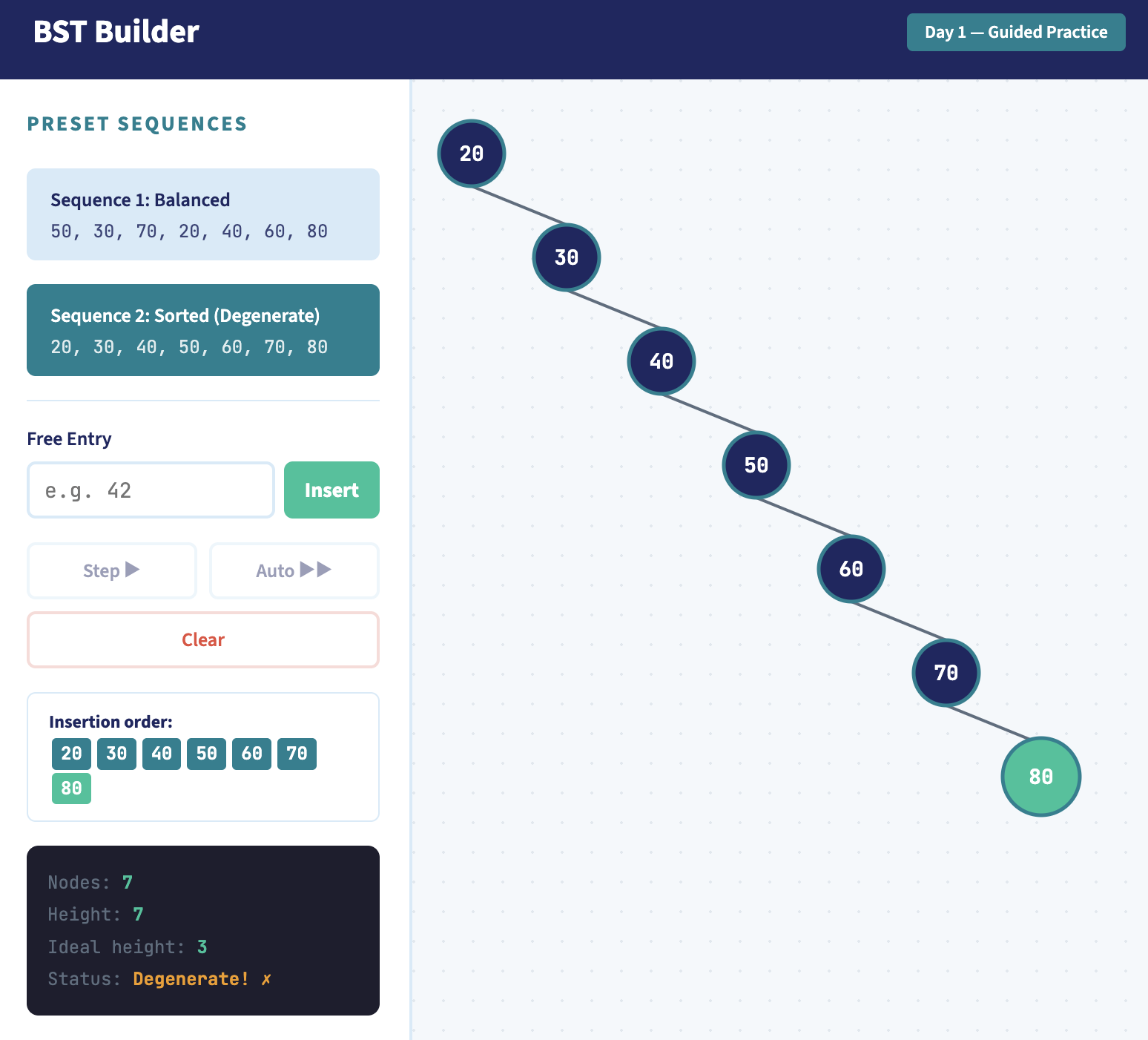
Beyond the presets, students can free-insert any value to test a hunch, step through insertions one at a time or let them auto-run, and clear the canvas to start over. Insertion extends the existing tree rather than resetting it, so a student can build a balanced tree, then deliberately add sorted values and watch it tip out of balance.
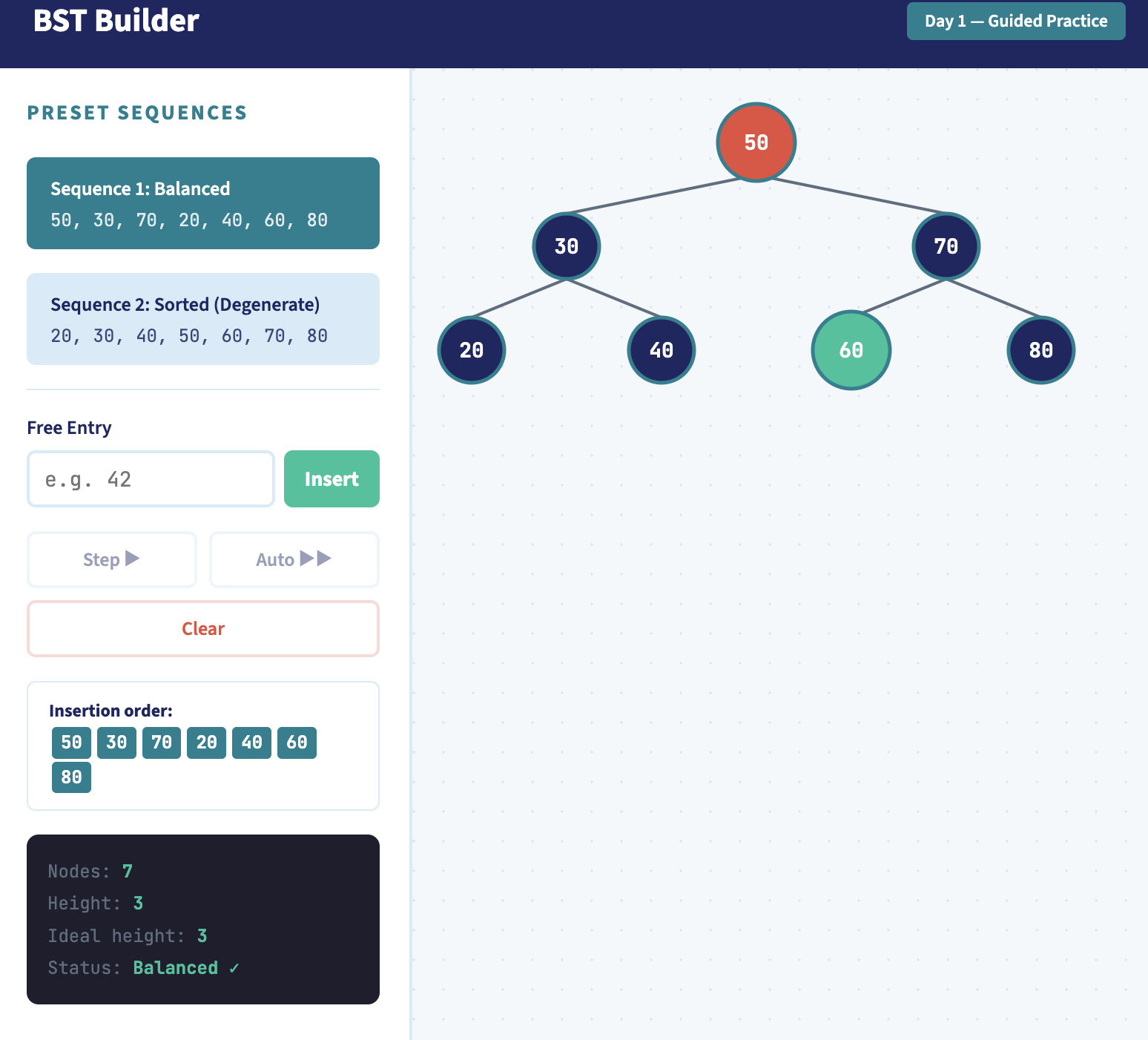
Deletion is where the tool earns its keep. Click any node and it turns red, marked for removal. For a leaf or a single-child node, it simply vanishes and the tree reconnects. But click a node with two children and the tool pauses: the node you're deleting glows red while its in-order successor glows green, holding that pairing on screen long enough to register before the successor rises into the deleted node's slot and the tree settles. The motion the whiteboard couldn't show, students can now watch happen.
Key decisions
React over vanilla JS. The insertion animations I could have done by hand, but deletion is really a small state machine (mark the node, hold the pause, mutate the tree, let it settle), and coordinating that in vanilla DOM means manual show/hide and a tangle of timers. Driving it with React state meant the animation became a function of state rather than a sequence of imperative DOM pokes. The tree you see is always just a render of the current data; I never reach in and move a circle myself.
A layout that's allowed to lean. Most tree-drawing code centers each parent over its children, which produces tidy diagrams, and quietly hides the exact thing I wanted students to see. So I assign each node's horizontal position by its in-order rank and its vertical position by its depth, nothing more. The payoff is the whole point: a balanced tree spreads into a pyramid, and a degenerate one collapses into a visible diagonal line. The layout isn't decorating the lesson, it is the lesson.
Insert extends rather than resets. Free-inserting a value adds to the existing tree instead of clearing it. That one choice turns the tool from a demo into an experiment: a student can build a balanced tree, then deliberately feed it sorted values and watch it tip out of balance in real time, rather than seeing two finished trees side by side and taking my word for the connection.
A deliberate pause on the two-child delete. When you delete a node with two children, the tool freezes for a beat with the doomed node red and its in-order successor green before the promotion happens, and that pause is noticeably longer than the one for a leaf. The hold isn't a loading delay; it's there so the pairing registers before anything moves. The single hardest idea in the unit gets the most screen time, on purpose.
One self-contained HTML file, no build step. The whole thing is a single file pulling React from a CDN, so it opens straight in a browser with nothing to install and drops onto any host. That's also why it lives directly on this site rather than as a hosted artifact elsewhere: it's just a file I can serve.
How it works
The whole tool rests on one idea: the tree is a pure function of the list of values inserted so far. State is just that ordered list of keys; the tree structure, the layout, and every stat are derived from it on each render. Nothing about a node's on-screen position is stored: it's recomputed from scratch every time, which is why I never have to keep the data and the drawing in sync. They can't drift apart, because the drawing is made of the data.
Insertion and deletion are both written as recursive functions that return a new tree rather than mutating the old one. Insert walks down comparing keys and returns a fresh node at the leaf; delete is the interesting one. Leaf and single-child removals fall out in a couple of lines, but the two-child case finds the smallest key in the right subtree (the in-order successor), copies its value up into the node being deleted, then recursively deletes that successor from the right subtree. It's the textbook algorithm, but writing it as "return a new tree" instead of "rewire these pointers" is what makes it safe to animate: each step is a clean snapshot.
function deleteNode(node, key) {
if (node === null) return null;
if (key < node.key) return { ...node, left: deleteNode(node.left, key) };
if (key > node.key) return { ...node, right: deleteNode(node.right, key) };
// found the node to remove
if (node.left === null && node.right === null) return null;   // leaf
if (node.left === null) return node.right;                    // one child (right)
if (node.right === null) return node.left;                    // one child (left)
// two children: promote in-order successor (min of right subtree)
let succ = node.right;
while (succ.left !== null) succ = succ.left;
return { ...node, key: succ.key, right: deleteNode(node.right, succ.key) };
}
The two-child case (last three lines) is the whole lesson: find the in-order successor, copy its value up, then delete the successor from the right subtree, returning a new tree at every step rather than rewiring pointers.
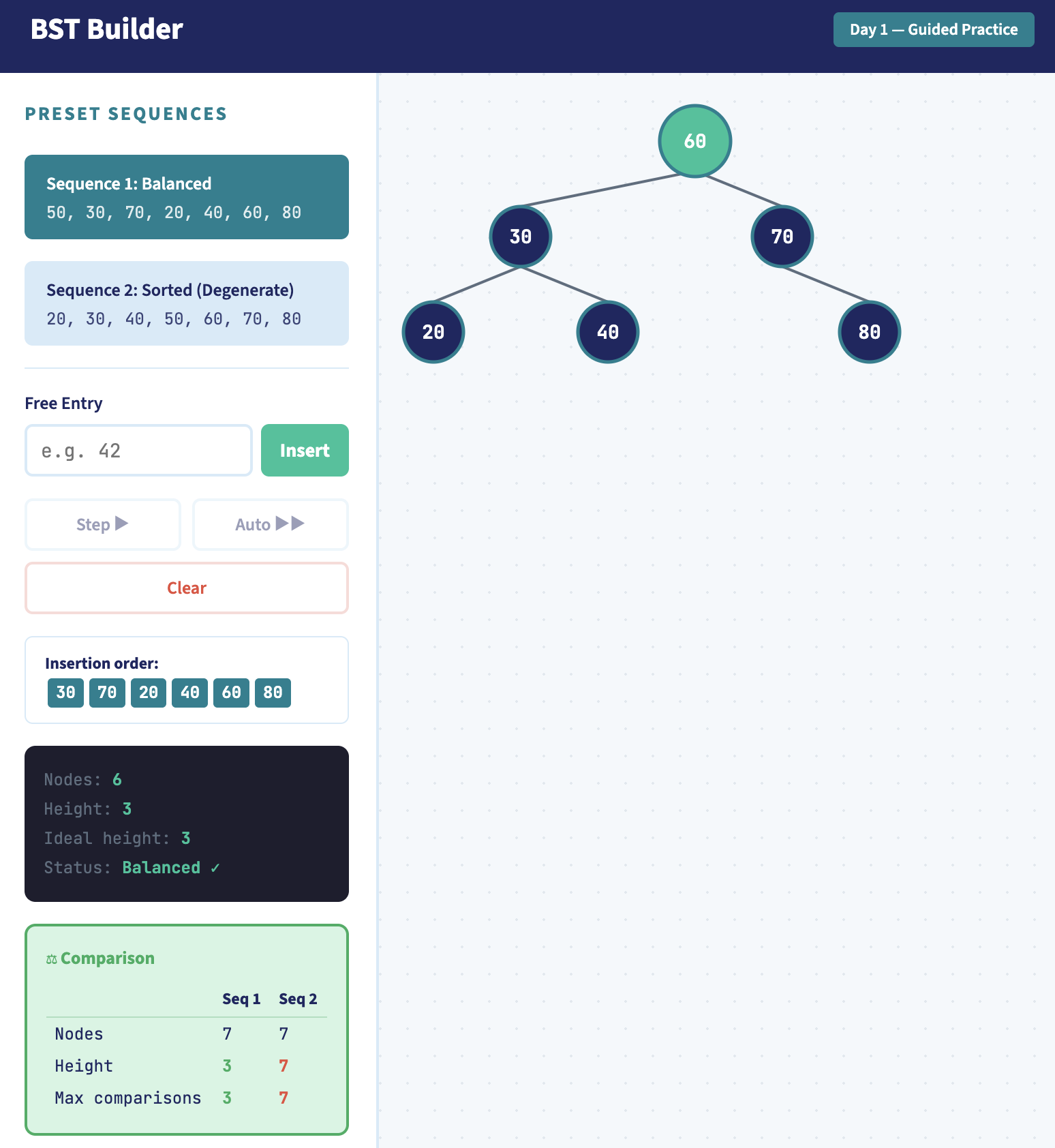
Layout is a single in-order traversal. I walk the tree left-to-right and hand each node the next horizontal slot as I reach it, while depth sets the vertical position. Because in-order traversal of a BST visits keys in sorted order, nodes always land left-to-right in value order with no overlap, and the tree's true shape (balanced spread or degenerate diagonal) falls straight out of the structure. The same traversal that lays the tree out is the one that finds the successor during deletion, so the visual logic and the algorithmic logic are literally the same walk.
The delete animation is a two-phase pause built on that immutability. Phase one sets an animation flag and tags the doomed node and its successor for the red/green highlight without touching the tree. After a timed beat (longer for the two-child case so the pairing reads), phase two runs the real recursive delete and clears the flag. The tree only actually changes in that second phase; everything before it is pure highlighting on top of unchanged data.
What I'd change
A proper layout algorithm. The in-order x-assignment is honest and simple, and it earns its place for the lesson, but it's also the tool's weakest engineering. Because every node claims the next horizontal slot regardless of the tree's shape, wide trees sprawl sideways and you end up scrolling to see all of a large one. The real answer is the Reingold–Tilford algorithm, which packs subtrees as tightly as they'll go while keeping parents centered and levels aligned. I'd keep the leaning-diagonal honesty for the degenerate case but stop wasting horizontal space on the balanced ones. It's the upgrade I'd reach for first.
Show the search path, not just the result. Right now the tool shows where a value lands, but not the comparisons it made on the way down. An insert or a lookup that briefly lit up each node it touched (is it less? go left; greater? go right) would make the O(log n)-vs-O(n) cost something students watch accumulate, rather than read off a table after the fact. The comparison table tells them the cost; an animated path would let them feel it.
Balance, eventually. The natural sequel to "watch a sorted insert degenerate into a vine" is "now watch the tree fix itself." A self-balancing mode (even just AVL rotations triggered on insert) would close the loop the comparison table opens. I left it out on purpose so this tool does one job, but it's the obvious next lesson, and the next tool.
Stack and links
BST Builder is a single self-contained HTML file: React 18 loaded from a CDN, JSX compiled in the browser, and the tree rendered as plain SVG. No build step, no dependencies to install: it opens in any browser and drops onto any host as one file. That simplicity is why it lives directly on this site rather than as a hosted artifact.
Try it: BST Builder →