Student Sentiment Analyzer
An Apps Script that scored daily student wellness check-ins through Google's Natural Language API, and surfaced students whose comments contradicted their self-ratings.
- Role
- Solo build, written in collaboration with ChatGPT
- Year
- September 2025
- Status
- Live
- Links
- Google Apps Script
- Cloud Natural Language API
- Google Sheets
The problem
My school ran a daily wellness check-in. Every student filled out a Google Form each morning with a numeric self-rating and an open comment, the responses flowed into a shared spreadsheet, and the counseling team scanned that spreadsheet to identify students who needed a check-in with a counselor.
The way the team used the spreadsheet was efficient and incomplete. They scanned the self-ratings column: low scores got attention, high scores got skipped. The comments column, where a student might have written something that contradicted their self-rating, mostly went unread. Volume made that necessary. A counselor could scan a building's worth of numbers in a few minutes; reading every comment from every student every day was a different scale of work.
The gap was the student who marks themselves a 4 or a 5 (fine, doing great) but writes a comment like "I just can't keep doing this" or "everything's terrible but it's fine." Numerically they look healthy; the words say otherwise. Those students were the ones most likely to slip through, and they were also the ones counseling most wanted to catch.
I wasn't on the counseling team. I taught math and computer science and served as an ed-tech mentor at the school, but neither of those roles asked me to touch the wellness data. The spreadsheet was sitting there, the comments were sitting there, and Google's Cloud Natural Language API existed. The tool was buildable in a few evenings, and the cost of building it was low compared to the cost of missing a student.
What I built
An Apps Script bound to the daily check-in spreadsheet that runs each comment through Google's Cloud Natural Language API and writes the sentiment score and magnitude back into the sheet next to the original row.
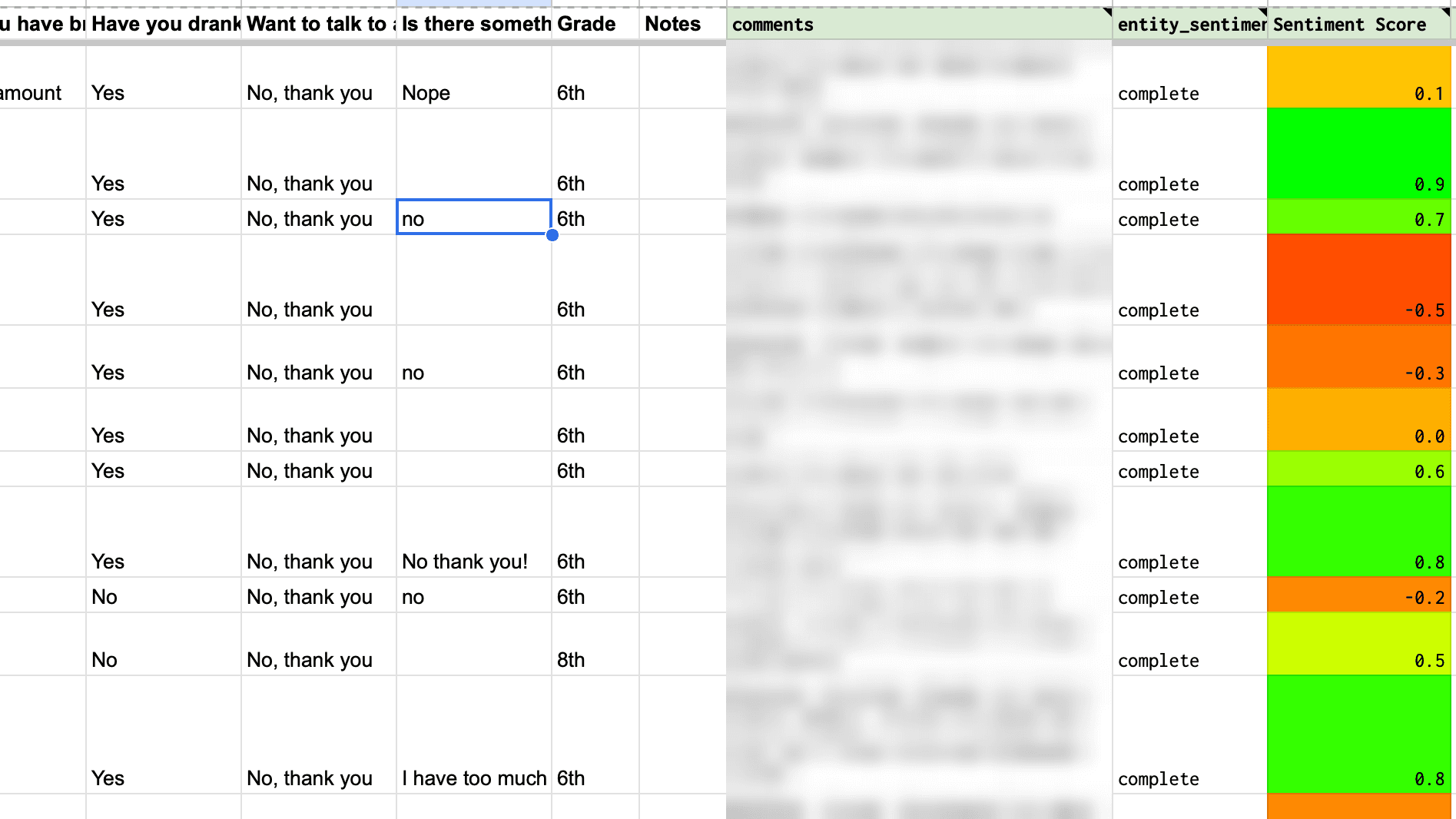
The script adds a custom menu to the spreadsheet: "Bill's Sentiment Analyzer" → "Click Here to Perform Sentiment Analysis." Clicking the menu walks the "Review Data" tab row by row, finds any row that has a comment but hasn't been processed yet, sends the comment to the documents:analyzeSentiment endpoint, and writes back three things: a complete marker so the script doesn't re-process the row on subsequent runs, the sentiment score (-1 for fully negative, +1 for fully positive), and the sentiment magnitude (a 0-and-up measure of how emotionally charged the text is, regardless of polarity).
The flagging mechanism isn't code; it's conditional formatting. The score column has a green-to-red color gradient, so a row's sentiment shows up as a color the counselor can see at a glance. The visual side-by-side does the rest of the work: a student whose self-rating was a 5 but whose sentiment-score cell glowed red was the one whose words contradicted their self-report, and that was the student to follow up with.
The script was adapted from Google's official feedback-sentiment-analysis Apps Script sample. ChatGPT pulled in the sample as a starting point, I directed the customization from there: the menu rename, the column structure for daily check-ins, the iteration that skips already-processed rows. The API integration was Google's; the application was ours.
Key decisions
Bring the analysis into the spreadsheet, not next to it. The counseling team already lived in the daily check-ins sheet. A separate dashboard, a Jupyter notebook, a web app: any of them would have required counselors to learn a new tool, leave the workflow they trusted, and add a step to their morning. Putting the analysis as a custom menu inside the same spreadsheet meant the experience didn't change for them at all: open the sheet you already open, click a menu item, scan the rows you'd scan anyway. Zero new tools.
Cloud Natural Language, not a model I had to host or pay per token for. The API returned both score and magnitude, and the magnitude axis turned out to matter as much as the score. A student who writes "I'm fine" scores roughly neutral with low magnitude; the same student writing "I'm fine. I'm fine. Everything is fine, I said." scores roughly neutral with high magnitude. Neutral score plus high magnitude (strong feeling, ambiguous direction) was a useful flag on its own. A simple thumbs-up / thumbs-down classifier would have missed that.
Conditional formatting as the flag, not a coded comparison. I could have written code that compared each student's self-rating to their sentiment score and produced an explicit "flag this kid" column. I didn't. Conditional formatting on the score column gave counselors the visual cue and let them keep their judgment in the loop: they were comparing two pieces of context, the number and the words, the same way they always had, with the words now colored for them. Trusting the humans with the final read was preferable to producing an automated verdict.
Started from Google's sample, not from scratch. The script's top comment links to Google's official feedback-sentiment-analysis Apps Script sample. I didn't try to build the boilerplate from nothing. ChatGPT pulled in the sample, I directed the classroom-specific adaptation. The provenance is honest: the API plumbing is Google's; what we added is the wellness application, the column structure, and the conditional-formatting flagging pattern.
How it works
A counselor (or I, when I was testing it) opens the spreadsheet and clicks "Bill's Sentiment Analyzer" → "Click Here to Perform Sentiment Analysis." The script iterates the "Review Data" tab and processes each new row, meaning each row that has a comment but no complete marker yet. For every new comment it makes a POST call to the Cloud Natural Language API, parses the response, and writes complete plus the score plus the magnitude into three columns to the right of the comment.
Conditional formatting then takes over. The sentiment-score column has a color scale applied (red for negative, white for neutral, green for positive), and once a score is written, the cell colors itself automatically. The counselor's scan becomes a visual sweep: any row where the self-rating is high but the score cell is red, or where the magnitude is unexpectedly large, is a row that asks for a second look.
In practice, the system surfaced several students whose comments didn't match their self-reports, and counseling followed up with each of them.
What I'd change
There are several improvements I would make, ranging from engineering hygiene to product-level changes.
On the engineering side, the API key is hardcoded at the top of the script instead of pulled from Apps Script's Script Properties, a security mistake I called out in the project's README but never went back and fixed. The script also relies on positional column lookups: it finds the entity_sentiment column by header name, then writes score and magnitude into the two columns immediately to its right, with no validation that those columns are named what they should be. That's fragile and would break the moment someone reordered the sheet. And the entity_sentiment naming is just wrong: the script calls documents:analyzeSentiment, which is Document Sentiment, not Entity Sentiment. I'd rename the column and clean up the misleading variable names.
The bigger gap is invocation. The script only runs when someone clicks the menu: there's no time-driven trigger and no onFormSubmit trigger. The right answer was always to bind the script to form submission so a new check-in got scored within seconds of being submitted, and counselors would see a fully scored sheet whenever they opened it. Setting up an automated trigger was on the roadmap but did not make it into the version that shipped.
The other change I'd make is the delivery model. Asking counselors to open the sheet and scan it every morning is more friction than it has to be. A daily digest email, sent overnight, summarizing the day's responses and highlighting the rows where the self-rating and the sentiment score diverged most, would bring the alerts to the counselors instead of expecting them to come look. That is the v2 I would build if I were to revive the project.
Which brings up the bigger question: I might. The script lives on the school's spreadsheet and isn't currently running between school years, but the use case isn't ours alone. Most schools run some version of a daily wellness check-in, and most school counseling teams face the same volume problem we did. The tool generalizes naturally. If I extend it (onFormSubmit trigger, daily digest email, a setup flow that any school could adopt against their own sheet), there's a real product here, and I am actively considering extending it for use by other schools and districts.
Stack and links
Built with Google Apps Script, calling Google's Cloud Natural Language API, bound to a Google Sheet that consumed daily Google Form responses. Adapted from Google's official feedback-sentiment-analysis sample, with ChatGPT as collaborator on the classroom-specific customization. Built in September 2025; currently dormant between school years, with planned extensions toward a packaged tool for other schools.